Yandex.Metrica BLOG PEMULA
loading...

CPX24.com

Google Ads

Minggu, 02 Juni 2013

[Custom ROM] XPERIENCE FRESHLEAVES SERIES For Galaxy Mini 2 GT-S6500D

>>>>>>>>>>" XPERIENCE ROM BY RACHDEZFIQ TEAM "<<<<<<<<<<

>" DO WITH YOUR OWN RISK,, I'M NOT RESPONSIBLE FOR ANY DAMAGE "<
>>>>>>> DO NANDROID BACKUP BEFORE FLASHING THIS ROM >>>>>>>

=======================================================


FEATURE :

  • Deodex
  • zipalign
  • root
  • squadzone kernel
  • 15 governor
  • STCN
  • Kernel Tweak
  • Driver Compose
  • New performance
  • init.d active
  • lock modifier
  • custom bootsplash
  • CRT ON/OFF
  • Bravia engine
  • Sound engine
  • Performance tweaks
  • Swap Sdcard
  • Different UI
  • Cyanogen Mod Layout
  • STCN Animation
  • 20 Toggle
  • Xperience bootanimation
  • build.prop engine
  • new fresh colour
  • dolby mobile
  • 2 launcher add
  • and many other engine and tweak

HOW TO INSTALL :

  • wipe data, 
  • wipe cache
  • masuk ke mount and storage
  • format cache
  • format system
  • kembali ke menu cwm
  • install from sd card
  • wipe data
  • wipe cache
  • wipe dalvik cache
  • reboot
CREDIT :

RACHDEZFIQ TEAM

  • ARCHILDZ RAFFIE
  • CHEPAY YUSRINDI ( ICE BLAST DEV )
  • DEDE FAWZY ( BLUE DOCIL DEV )
  • RIZKIABDILAHAKBAR BABEHNAPHAEDRA ( BIO HAZMAT DEV )
  • FIKRI ANGGA PRATAMA ( CHOCONOOBS DEV )
  • ZIE ZIE CHIKALLIZER 

MANY THANKS TO

  • FIKRI MUHAFFIDZ IMANI
  • ALL REGINA DEV
  • K47 ( ACID ENGINE )
  • KANG LS (33D INVANDER DEV )
  • JMKL SIX
  • ARIF SETYAWAN ( SABOTAGE DEV )
  • ALL WINTER DEV
  • YUDHISTIRA ( HONEYCREAM DEV )
  • BRIAN RAHARDI
  • SUHENDRA ADE DERMAWAN
  • A'AY GYGABITE
  • SUCI ARIYAN FITRIYANA
  • HANNY YUSRINDI
  • YOU AND ALL SUPPORT ME

SCREENSHOT

https://www.facebook.com/media/set/?set=a.452144501522457.95586.100001807327735&type=3

LINK

http://adf.ly/OLO6T

Cara Flashing Galaxy mini 2 GT-S6500D menggunakan ODIN

Seorang teman menghubungi saya karena smartphone nya tidak dapat booting setelah instalasi Custom ROM.

Setelah saya lihat, smartphone Samsung Galaxy Mini 2 nya memang stuck di logo Samsung saja, dan setelah tunggu punya tunggu, tetap proses booting tidak berlanjut.
Setelah saya interogasi terlebih dahulu si empunya Samsung Galaxy Mini 2 ini, ternyata dia coba-coba belajar instalasi custom ROM, dan sayangnya proses instalasi custom ROM nya tidak berjalan mulus. Bahkan custom ROM yang di-download pun salah! Seharusnya ROM yang digunakan adalah custom ROM untuk GT-S6500D, eh malahan dia download custom ROM untuk GT-S7500 (Galaxy Ace Plus). Jelas saja si smartphone ngambek, karena disuruh memakai ROM yang bukan untuk dirinya.
Langkah pertama yang saya lakukan tentu saja mencari dulu stock ROM untuk GT-S6500D, dan mencari CWM Recovery yang cocok. Tapi karena saya lagi males, saya pakai saja CWM Recovery miliknya Samsung Galaxy Y (GT-S5360), dan ternyata cukup cocok.
Tapi ternyata proses recovery lewat CWM Recovery tidak berjalan mulus, karena setelah beberapa kali saya coba reflash, tetap si smartphone tidak bergeming dari posisi logo Samsungnya pada saat booting. Akhirnya mau tidak mau saya harus menggunakan metode reflash menggunakan ODIN.
Flashing ROM menggunakan ODIN
Berikut bahan-bahan yang diperlukan untuk melakukan flashing melalui ODIN:
1. Kabel data
2. Software ODIN
3. Stock ROM. Untuk contoh kasus ini, tentu saja saya pakai stock ROM GT-S6500D.
Langkah-langkah flashing dengan ODIN
Catatan kecil:
Semua gambar printscreen dibawah ini mengacu pada proses flashing untuk GT-S7500D, karena awalnya saya juga mengira smartphone yang sedang di-operasi adalah Galaxy Ace Plus dari tampilan awal booting, seperti yang sudah saya ceritakan di awal artikel. Tapi ternyata proses flashing pun gagal karena ROM yang tidak sesuai. Akhirnya saya lihat di label belakang smartphone, ternyata model yang sedang saya operasi adalah Samsung Galaxy Mini 2 GT-S6500D!
Jadi bila kisanak salah mendownload ROM, maka tampilan awal booting pun akan mengikuti ROM nya.
kemudian saya pun jadi malas bikin printscreen lagi hehehe…
Lanjut:
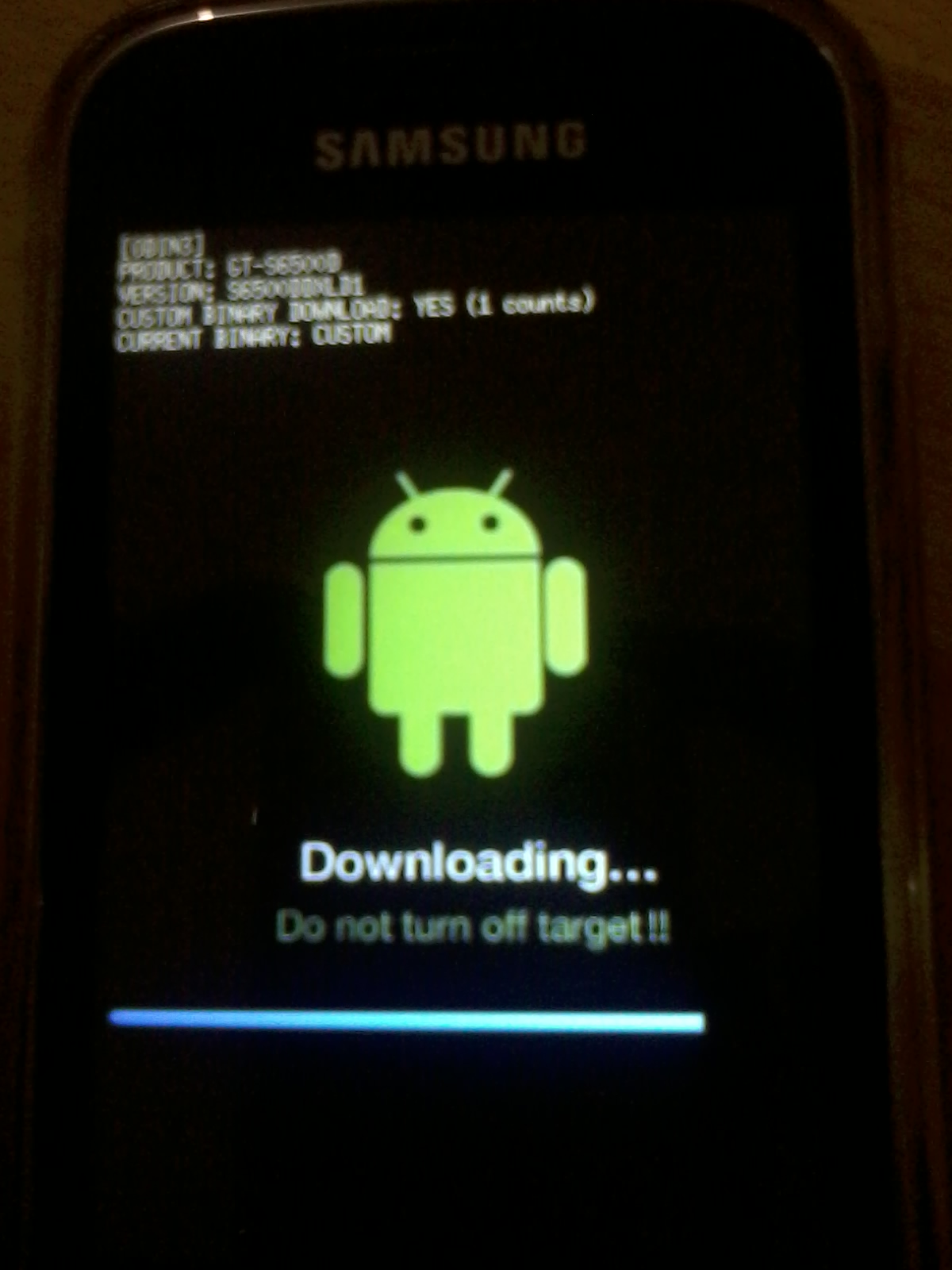
1. Masuk ke ODIN mode melalui kombinasi tombol POWER+HOME+Volume DOWN, dan ikuti petunjuk yang tampil.
2. Aktifkan ODIN di komputer
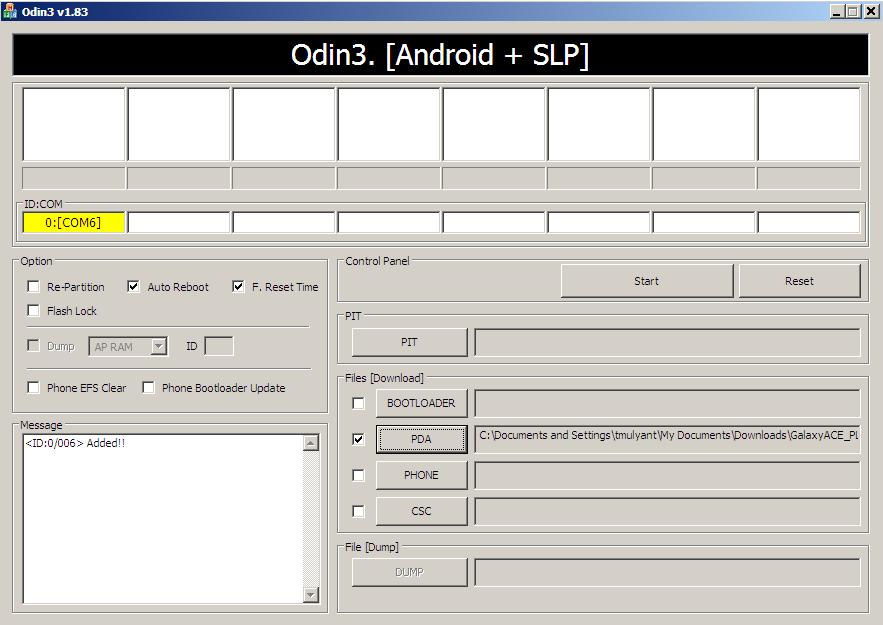
3. Tancapkan kabel data, dan tunggu hingga ODIN mengenali perangkat yang tersambung:
Tunggu hingga ODIN mengenali perangkat, yang ditandai dengan pesan “<ID ***> Added!” pada message box.
4. Klik tombol PDA pada kotak Files [Download] dan pilih file ROM yang telah di-download (S6500DDXLD1_S6500DOLBLD1_S6500DDXLD1_HOME.tar.md5)
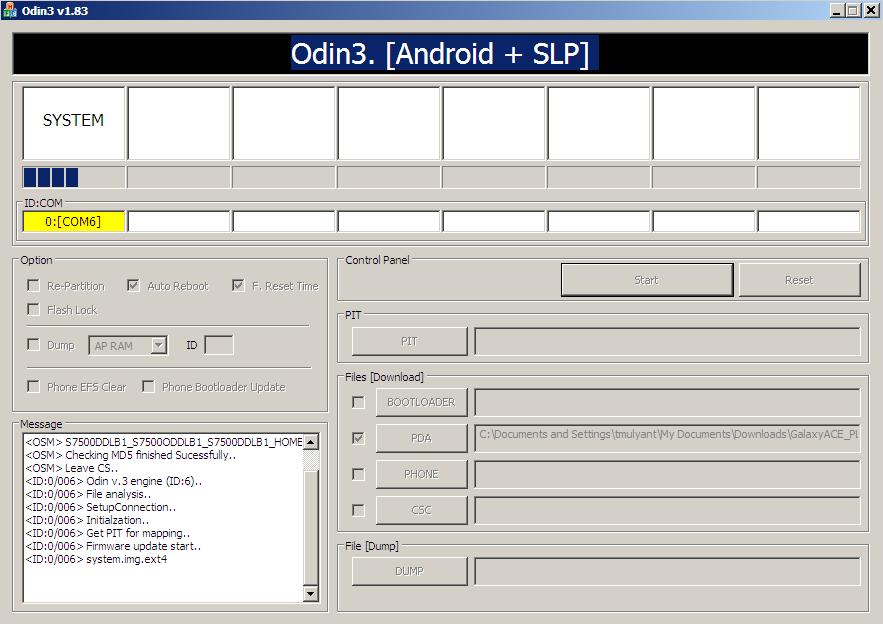
5. Setelah semuanya siap, klik tombol Start pada kotak Control Panel dan tunggu hingga proses flashing selesai:
6. Proses flashing bisa dibilang selesai bila ada indikator “<OSM> All threads completed. (succeed 1/failed 0)” pada message box. Bila proses flashing sudah selesai, cabut kabel data, dan matikan ODIN. Selesai!
Dan Samsung Galaxy Mini 2 teman saya pun sehat kembali seperti sedia kala.
Mudah-mudahan artikel diatas bermanfaat buat kisanak sekalian, dan saya doakan semoga berhasil!

Cara Update Galaxy Mini 2 S6500D to CM10.1 Android 4.2.2 Jelly Bean Custom ROM


Team behind CM ROMs were kind enough to consider Galaxy Mini 2 S6500D by releasing CM10.1 Android 4.2.2 Jelly Bean custom ROM for Galaxy Mini 2 S6500D. CM ROMs are famous for their simple look, tons of features and fast speed. In this post you will learn how to update Galaxy Mini 2 S6500D to CM10.1 Android 4.2.2 Jelly Bean Custom ROM. Since this is custom ROM so you will need to have your device rooted and have ClockworkMod (CWM) Recovery installed.

As you proceed further, you will find tutorial on how to install CM10.1 Android 4.2.2 on Galaxy Mini 2 S6500D . Apart from that you will find our tips and tutorials on how to backup your important data so you don’t lose your data if something unusual happens. This firmware is completely unbranded and you can install it on any Galaxy Mini 2 S6500D.
Disclaimer: All the firmwares, custom ROMs, official firmware updates, mods and tools mentioned here belong to their respective developers/owners. You will be doing everything at your own risk. We or the developers cannot be held responsible if you end up damaging or bricking your device.

Download Galaxy Mini 2 S6500D Latest USB Drivers:

Since you will need to connect your smartphone to your PC, so you will need to have your Galaxy Mini 2 S6500D drivers installed on your computer. If you have not yet installed your smartphone drivers on your PC, you can download latest official drivers for your Android device from Samsung website.

Backup Apps and Other Data:

One last thing before you start following the tutorial is to backup your important data like Call logs, SMS, Emails, WhatsApp Messages etc so just in case something goes wrong, you don’t lost your data.
We recommend going through our backup tips and tutorial below to have backup of your important data:
  • Backup Contacts, Google Data and Gmail –> For that sync your device with Google Sync.
  • Backup SMS Messages –> How to Backup and Restore SMS Messages.
  • Backup Call History –> How to Backup Call History.
  • Backup WhatsApp Messages –> How to Backup/Restore WhatsApp Messages.
  • Backup your network APN Settings (GPRS, MMS, 3G) –> Go to Settings –> Wireless & Network –> More –> Mobile networks –> Access Point Names. Note down the settings from here in safe place.
  • Backup your Apps –> How to Backup Apps in Android
If you are Samsung user, then you can easily create backup of your data using Samsung KIES while if you have rooted device and have ClockworkMod or TWRP custom recovery installed on it, then we will recommend to create a backup using that tool as it will create complete image of your existing phone state.
Once you are done with creating backup, you are ready to go. But we would like you take a look of few more things before you proceed:
  1. Make sure your device is fully charged (Min 80% charge remaining in battery). It is because if your phone goes off during installation of official firmware or custom ROM, then there is high chance that your phone might get bricked which is not part of a plan. Don’t know how to check battery percentage? No worries, take a look of this tutorial: How to Check Battery Percentage in Android.
  2. If your computer is not recognizing your phone then you will need to enable USB debugging mode on your device. Don’t know how? Take a look of this tutorial: How to Enable USB Debugging
  3. Most of the custom ROM or firmware we cover here are for Android devices which are factory unlocked. So we would recommend not to try it on your Android device if it is locked unless the custom ROM or firmware is specifically for your phone or tablet.
Ready to install CM10.1 Android 4.2.2 Custom ROM on Galaxy Mini 2 S6500D? Alright, you can now safely follow the tutorial below.

Update Galaxy Mini 2 S6500D to CM10.1 Android 4.2.2 Custom ROM

Below we have put together a complete step-by-step tutorial on how to install CM10.1 Android 4.2.2 Custom ROM on Galaxy Mini 2 S6500D.
Few things to remember:
  • Installing this custom ROM on your phone will wipe all the data.
  • Samsung KIES won’t be recognizing your device after installing this custom ROM on it.
  • This tutorial is only meant for installing CM10.1 Android 4.2.2 Custom ROM on Galaxy Mini 2 S6500D.
  • Perform full data wipe before installing this custom ROM.
Once you are done with everything, you can follow the steps below:
Step 1) Download CM10.1 Android 4.2.2 Custom ROM for Galaxy Mini 2 S6500D.
Step 2) Connect your Galaxy Mini 2 S6500D to your PC and copy the downloaded file to SD card.
Step 3) Turn OFF your phone.
Step 4) Now you will need to get your phone in Recovery Mode. For that turn ON the phone while pressing Volume Up + Home + Power buttons until the screen flashes and then release all the buttons.
Step 5) Now in ClockworkMod recovery, you will need to wipe data first and then scroll down to flash zip from SD card and using Power button, select it.
Step 6) Again press power button and select choose zip from sdcard.
Step 7) Navigate to Android 4.2.2 ROM zip file using volume keys and select it with the help of power button. Confirm installation to start it.
Step 8) When the installation is completed, go to +++++Go Back and then reboot your phone from recovery menu. You phone will take up to 5 minutes to reboot for the first time.
That’s it. You have successfully installed CM10.1 Android 4.2.2 on your Galaxy Mini 2 S6500D.
Faced any problem following the tutorial above? Just drop comment below we will help you out ASAP.

Minggu, 31 Maret 2013

CyanogenMod 10 Jelly Bean 4.1.2 For Galaxy Mini 2


   Assalamualaikum sobat blogger... OK langsung saja ini ada cusrom rom Cyanogenmod 10.1 dengan Fitur ala Jelly Bean 4.1.2 untuk Samsung Galaxy Mini 2. Bagi agan yang make galmin 2 ayo silahkan dicoba! Sayangnya masih ada bugnya seperti kamera, usb, wifi & thetering. Tapi kalo agan mau nyoba sih silahkan saja yang penting komentar ya?

   Custom Rom ini sudah dicoba dengan Galaxy Mini 2 GT-6500D. Mungkin juga bisa di galmin 2 varian yang lainnya. Kalo kata developer sih bisa di GT-S6500, GT-S6500D, GT-S6500T, GT-S6500I, dan kemungkinan ada beberapa masalah saat menginstalnya, maklum masih dalam tahap pengembangan.


APA YANG BEKERJA ?

* Full GPU acceleration
* RIL (calls/sms/mobile data)
* Wi-Fi
* Touchscreen
* Touch keys
* Multitouch
* Audio
* ADB
* Mounting of internal/external storage
* UMS
* Keypad lights
* Brightness control
* Vibrator
* Deep sleep
* GPS
* Sensors (all)
* Data usage, limiter
* HW v-sync

BUGS ? ( Kurang Fit )

* Camera ( 95% fixed* )
* Bluetooth ( 60% fixed* )
* USB, Wi-Fi, Bluetooth tethering

SCREENSHOOT :


PERHATIAN : Jangan melakukan flashing custom rom jika anda tidak ingin beresiko. Saya tidak bertanggung jawab atas kejadian yang dapat merugikan pengguna

DO WITH YOUR OWN RISK

Cara Instal :

Step 1 : 

1. Sudah di upgrade Ginggerbread 2.3 ke atas jika belum klik disini
2. Galmin sudah di Root jika belum klik disini
3. Sudah terinstal CWM (Clock Word Mod) jika belum klik disini
4 Backup dahulu data-data penting ke kompi

Step 2 :

1. Download cm-10-20130112-EXPERIMENTAL-jena.zip  disini (pilih salah satu)
2. Taruh file zip di sdcard. Di luar saja biar gampang di cari.
3. Matikan hape, lalu tekan tombol HOME + POWER secara bersamaan.
4. Pilih wipe data klik "yes" lalu wipe chace "yes"
5. Pilih instal zip from sdcard> Choose zip from sdcard> pilih cm-10-20130112-EXPERIMENTAL-jena.zip  yang sudah di download tadi.
6. Pilih lagi wipe data dan cache untuk memamstikan (ulangi langkah no. 4)
7. Reboot System

Untuk pertamakalinya membutuhkan waktu 5-10 menit bootanimation.

ingat ;

DO WITH YOUR OWN RISK


sumber : http://forum.xda-developers.com

[Custom ROM] REGINA V1 & V2 For Galaxy Mini 2 GT-S6500D

=============== REGINA ROM ================

This is Cusrom for Jena :D ... cekidot ...
ScreenShot:


Feature in Regina :

  • Root
  • Busybox
  • Deodex
  • AdwEx default loncer
  • Audio Beats include
  • Add background setting
  • support EDT
  • Squadzone kernel
  • OC up to 1.1 GHZ
  • Governor and I/O support
  • Add Set cpu for OC
  • CRT off effect
  • MMS mod : 
- Sent Time displayed instead of the Received Time
- No AutoConverting messages to MMS after 4 SMS.
- Possible to add to the message 200 contacts instead of 10 contacts
  • support Batteray line
  • support BLN
  • add 14 lidroid statbar
  • New look for framework-res and systemui
  • Include Arabic and uncode font
  • Free from tulisan kotak kotak :D
  • New bootanimation
  • Swap memory interneal with external sd
  • Add Career icon
  • Default Regina wallpaper
  • Remove stock keyboard and change it with Smartkeyboard
  • Remove aplikasi g penting gitu dah :D
  • Add Regina Labs, when include :
- status bar twaek : tulisan regina merah kyk di ss
- batteray line : garis putih penunjuk batrai
- BLN control : ngatur led tombol
- DSP manager : full equalizer
- System Replacer : mempermudah push apk
- any more... :D
  • ICS settings style
  • And Any more ... :D
==============================================
How to install :
1. Put Regina Rom.zip on your sd card
2. go to recovery mode
3. wipe data n cache
4. install zip from sd card - flash Regina rom.zip
5. Reboot
6. setelah bootanimation emg agak lama tunggu aj
7. ater finish scanning sd card, reboot again and enjoy it

kalau stuck di CWM agan harus fresh instal dari odin ... jadi flash ulang via odin termasuk flsh cwm
baru flash regina ... ini karna CWM jena masih belum stabil ... tapi kalo g stuck biar aja

JANGAN PAKE CWM ACE !!! ane dah coba juga dari CWM Ace ... flash berhasil dan bisa masuk HS, tapi pas reboot malah mati ndiri .. tapi klo mw coba silahkan :D

==============================================
Penjlasan bug dan solusi :
  1. Jika tulisan habis instal nge zoom, bukan masalah, go to setting-Regina labs- font size ... pilih sembarang ... disini agan juga bisa membesar/mengecilkan tulisan 
  2. Flashligt di statbar memang akan FC, semua rom nemu kyk gitu. XD .. senter juga gak guna pun, cara ny di hide aja, regina labs-widget button... trus jgn ceklis untuk flash light
  3. Biar statbar transparan, go to setting adw- general behavior- system prefence ... jangan ceklis wallpaper hacck
  4. Quick pic ny harus di update yak .. ane g tw knpa g work T_T .. ane kasih ini biar pasang wallpaper d adw g ngezoom
  5. Kalo ada prtanyaan , silahkan post di grup ...
==============================================

Special thanks :
-Allah SWT
- Nces albertus ( you teach me from zero )
- JMKL six ( your icon and style is Very good )
- Heri setiawan and fedy kusuma ( your both Rom Inspired me )
- Ricky Outsider, Lihat selengkapnya , Rata bila bagi , Catur Budi , Muhammad jadi suwito, Eddy
nugroho, etc ( thanx for you all coz answered my questions)
- Singgih BK ( thnx for editng Lidroid for me )
- Yanuar Harry ( thnx for kernel )
- Temporary Official grup gyoung ( my lovely grup, thnx for icon, knowledge, and anythng)
- Grup Galaxy Wonder, Shuvit,Mini, XDA, Google, etc.. ( thnx for knowledge and answer my question
- Faisal Ridhaul akbar ( thnx for editing logo Regina )
- Orang2 yg gak kesebut karna kebanyakan and g ingat ane ny ( thnx for you all )
- Grup Galaxy mini 2
- And You ...
==============================================
IF YOU RESPECT MY WORK , PLEASE DONT MIROR LINK ...
IF YOU RESPECT MY WORK , DOAIN KAKI ANE BIAR BISA JALAN LAGI :D ..

LINK REGINA ROM : http://www.mediafire.com/?jd8z2bh27qrcib2


UPDATE
ReGIna V2 ini WAJIB Install REGINA V1 dulu


================= REGINA V2 ==================
This is update for REGINA ROM, add new feature, cekidot :

SreenShot :


  • New bootanimation
  • add Expanded Power Menu
  • JB style statbar
  • add 6 Lockscreen
  • add CRT ON and OFF animation
  • Edit some build.prop
  • 15 toggle bar
  • JB default font
  • Holo Launcher
  • add more than 35 font
  • customize Carrier, Layout, and statbar background with Greper
  • New usb connected mode
  • Disable CPU Rendering

*NB: jika ingin aktifkan fitur disable cpu rendering ny, go to system/lib/egl trus rename file libGLES_android.so , sembarang aja .. ini akan meningktakan performance... biar lebih jozz bisa edit build prop agan dgn nmbh Line di link ini

http://forum.xda-developers.com/showthread.php?t=1887997

How to Instal :
1. Put on sdcard
2. Go to cwm
3. Flash it ...
4. after get in HS, change lockscreen in regina labs n reboot

NB :
  1. Ini update REGINA, jadi harus udah make regina ya
  2. gak perlu wipe cache/data
  3. Carrier,Layout dan background statbar bisa di ganti tanpa reboot, Regina Labs> statbar greper, cukup sediain gambar ny di sd card
  4. Kalo mau transparan Holo ny , utak atik aj seting drawerny
  5. Download mode di EPM g fungsi, jdi bakal reboot biasa , ribet soalny XD..
  6. Setelah Flash lockscreen jd agak aneh XD .. abaikan aja, langsung ganti trus Reboot
  7. TEST ON FRESH STOCKROM >REGINA V1>REGINAV2 Dan enggak stuck/Bootloop
  8. boot akan agaka lama karena sedangmengapply service.jar
Thanks :

Tanpa orang2 ni, ini semua gak ada XD ...

  • - YudhiezChitilieaz & ArifSetiawan ( HoneyCream DEVs )
  • - Faisal Ridhaul Akbar ( help to editing theme )
  • - Brian Rahardi (6 lockscreen XD )
  • - Ikhwan Anshori ( theme jb for regina )
  • - YOU
LINK REGINA V2 : http://www.mediafire.com/?57hnt8dpz0sffdd

Update

REGINA V3 Evolution di Sini

IBX5A79C52B385A7